
Migrating from Quantopian to IBridgePy can be very easy in some cases even without making code changes. This comprehensive guide will help you understand the process of migrating from Quantopian to IBridgePy as smooth as possible using Python stock trading with Interactive Brokers for algorithmic trading.
As a short description, in the runMode of run_like_quantopian, the initialize function will run once at the beginning of the algorithm and handle_data function will run every minute, just like how they perform at Quantopian.
Step 1: Download IBridgePy to your local folder
You need to check the version of your Python, either Python 2.7 or Python 3.x and check if it is 32-bit Python or 64-bit Python. When migrating from Quantopian, download IBridgePy according to your Python version from www.IBridgePy.com/download
Assume the path of the folder where you save IBridgePy is C:\ABC\DEF\IBridgePy
Step 2: Complete preparation steps
step 2. 1 Install Anaconda
For Windows users, Anaconda is required.
- For your convenience, use this link Anaconda3-5.0.1-Windows-x86_64.exe to download Anaconda Python 3.6 for windows users.
- Use this link Anaconda2-5.0.1-Windows-x86_64.exe to download Anaconda Python 2.7 for windows users.
For Ubuntu users, do NOT install Anaconda. You need to use native Python 2.7 64-bit
For Mac users, you can choose to install Anaconda or not. You may refer to this tutorial to debug on Mac if any issues.
step 2.2 Configure TWS or IB Gateway
The detailed steps are described in this webpage.
step 2.3 Log into IB TWS or IB Gateway
IBridgePy can trade in IB live accounts and paper accounts. It is highly recommended to test your strategies in a paper account. If you don’t have an IB account yet, you are welcome to use IB’s public demo account. However, IB’s public demo account does not behave as same as live accounts or paper accounts do.
User name is “fdemo” —- without quotation marks
Password is “demouser” —- without quotation marks
After you finish this step, either IB Gateway or TWS should be open and active.
Step 3: Copy and Save your Quantopian algorithms
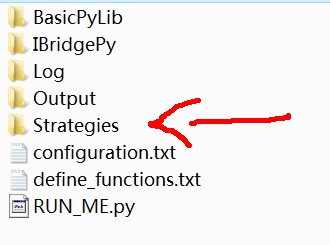
Save your Quantopian algorithms in a folder called “Strategies” that is a sub-folder of IBridgePy (C:\ABC\DEF\IBridgePy\Strategies). The file extension should be “.py” because they are Python scripts. In the following, assume the file name of your algorithm is MyAlgo.py , and it is saved at C:\ABC\DEF\IBridgePy\Strategies\MyAlgo.py
Step 4: Edit RUN_ME.py in Spyder
Open RUN_ME.py (C:\ABC\DEF\IBridgePy\RUN_ME.py) in Spyder.
Put your IB account code into RUN_ME.py

Hi,
Have you guys thought about Robinhood integration? Does it sound like a project you would work on?
Vincent
We would love to integrate Robinhood with IBridgePy. Robinhood will support IBridgePy if there are a lot of customer requests.
Awesome! Are you guys collecting any signatures or forms to get Robinhood to support us? I would love to help
You can contact with Robinhood and ask them to consider IBridgePy as a partner.
they have an unofficial api. I don’t believe partner status is really needed, they will be rolling out an official api here soon and it would be really nice to not have to migrate code.
I am a loyal Robinhood algo trader. I asked Rh for help / direction on viable options for live trading algo traders such as myself.
@IBridgePy
Do you have plans to support pipeline soon?
We plan to support pipeline later but not soon.
Thank you!
Following mail sent yesterday (traceback,last line:
File “C:\Python27\lib\site-packages\IPython\core\ultratb.py”, line 617, in _format_exception_only
Colors.Normal, s))
UnicodeDecodeError: ‘ascii’ codec can’t decode byte 0xf3 in position 38: ordinal not in range(128)
Any sugestion?
I am installing and trying to connect thru run_me.py and getting historical data
https://ibridgepy.com//q-a/#Q_8216ascii8217_codec_can8217t_decode_byte_0xb2_in_position_20_ordinal_not_in_range128_What_cause_this_error
success!!: changing to IBridge 32 from 64
Anyone here have any success experience running the IBridgePy in Ubuntu with https://ibridgepy.com//wp-content/uploads/2017/09/IBridgePy_ubuntu.zip
I’m hitting the following roadblock:
Traceback (most recent call last):
File “RUN_ME.py”, line 35, in
exec(script)
File “”, line 8, in
File “/root/ib-api/IBridgePy/IBridgePy/quantopian.py”, line 1, in
from IBridgePy import IBCpp
ImportError: /root/ib-api/IBridgePy/IBridgePy/IBCpp.so: undefined symbol: GENERAL_NAME_free
Any idea what went wrong? The following is my python environment:
Python 2.7.12 (default, Nov 19 2016, 06:48:10)
[GCC 5.4.0 20160609] on linux2
Type “help”, “copyright”, “credits” or “license” for more information.
>>> import struct
>>> print(8 * struct.calcsize(“P”))
64
Thanks in advance.
https://ibridgepy.com//q-a/#Q_I_am_using_IBridgePy_on_Ubuntu_but_see_the_error_message_of_8220undefined_symbol_GENERAL_NAME_free8221_Can_you_help
Please try the latest version of IBridgePy on Ubuntu. Thanks
Please try the latest version of IBridgePy on Ubuntu. Thanks
The bug is fixed in version 1.20170913. Thanks
Has order_target_percent been implemented? Don’t see any references to it in the release notes.
I am running an algo but it hasn’t placed any orders yet so I am worried that it will fail when it comes onto that command.
order_value ( ), order_target_percent ( ), order_target_value ( ) and record ( ) are added from version 2.20171012
order_value ( ), order_target_percent ( ), order_target_value ( ) and record ( ) are supported by IBridgePy version 2.20171012
Hi,
I read the Tutorial again and have the following questions:
1. before_trading_start
>>The time when before_trading_start is called can be configured by users.
In the ‘configuration.txt’? But how?
2. sid()
Do you support the sid() as in Qauntopian?
3. Order types
It seems you have only three order functions: oder(), order_target() and order_percent(). How about the others as by Quantoipian such like: order_value(), order_target_value() and order_target_percent()
4. ocaGroup in create_order()
Seems the oca = oco (one cancle the other), right?
5. Relation betwwen create_order() and place_combination_orders()
I understand one has to use the create_order() to create order legs and then use the place_combination_orders() to place these legs. Correct?
Hi,
Will IBridgePy have the pipeline function as in Quantopian in the future?
Yes, we are developing pipeline functions.
Hi,
Looking forward to trying this out. Just installed and setup everything, will try porting over my algo today and running for the next few days.
Qustion: How do we run multiple algos? Do we clone RUN_ME.py for each algo and run them simultaneously? Example: RUN_ME_algo1.py, RUN_ME_algo2.py, etc.
Thank you.
Use schedule_function to separate different algos and everything is included in one py file.
This means you run multiple algos on a single account. I am not sure if this is a good idea.
The best way is to run single algo on single account, the so-called multiple account. But you would chage for that. :-/
I’m running into the same issue. Has anyone resolved this?
It is solved in the version 2.20171004
Can the IBridgePy placed in any directory?
Yes. Anywhere.
How can I edit the run_me.py for FA account to manage client accounts?
You cannot make it happen in IBridgePy free community version. Please contact with IBridgePy@gmail.com and ask for IBridgePy for Multi Account. Thanks
Can’t I use IbridgePy stand-alone or I have to use it with platform provided by http://www.interactivebrokers.com?
If you want to live trade, you need to use IBridgePy with http://www.interactivebrokers.com
I can’t get historical data for some etfs. Is there a exhaustive list of security_info.csv?
For e.g. I can’t get prices for EWG
Also, if I want the index price for Shanghai index , or SENSEX what should I do?
https://ibridgepy.com//q-a/#QIt_seems_the_stock_of_8220XYZ8221_is_not_in_the_file_of_IBridgePysecurity_infocsv_I_wonder_for_what_purpose_you_use_this_csv_file_What_should_I_do
I simply cloned an algo from quantopian to see if I could figure this all out. I have IB, everything nearly set. Forgive my ignorance as im no expert at this but I get an error “no module: quantopian.pipeline.data.builtin” What do I do?
Is pipeline already supported?